

Hi everyone, I'm Stefan, an independent developer based in Hong Kong and the creator of Tesla Wrap Pro.
The project started from wanting to customize the 3D vehicle shown on a Tesla's screen. I wanted to introduce the free manual editor here and explain a simple way to use it with artwork you already have.
A first manual design
Open the gallery, choose the vehicle model you need, and select a design that supports editing. Add an image you own or have permission to use, or add a short text label. Adjust the size and position, change panel colors, and compare the flat layout with the 3D preview.
Before downloading, look at the front, rear and both sides. A detail that looks good in the flat layout may cross a panel edge awkwardly on the vehicle. Moving it slightly can help without having to create new artwork.
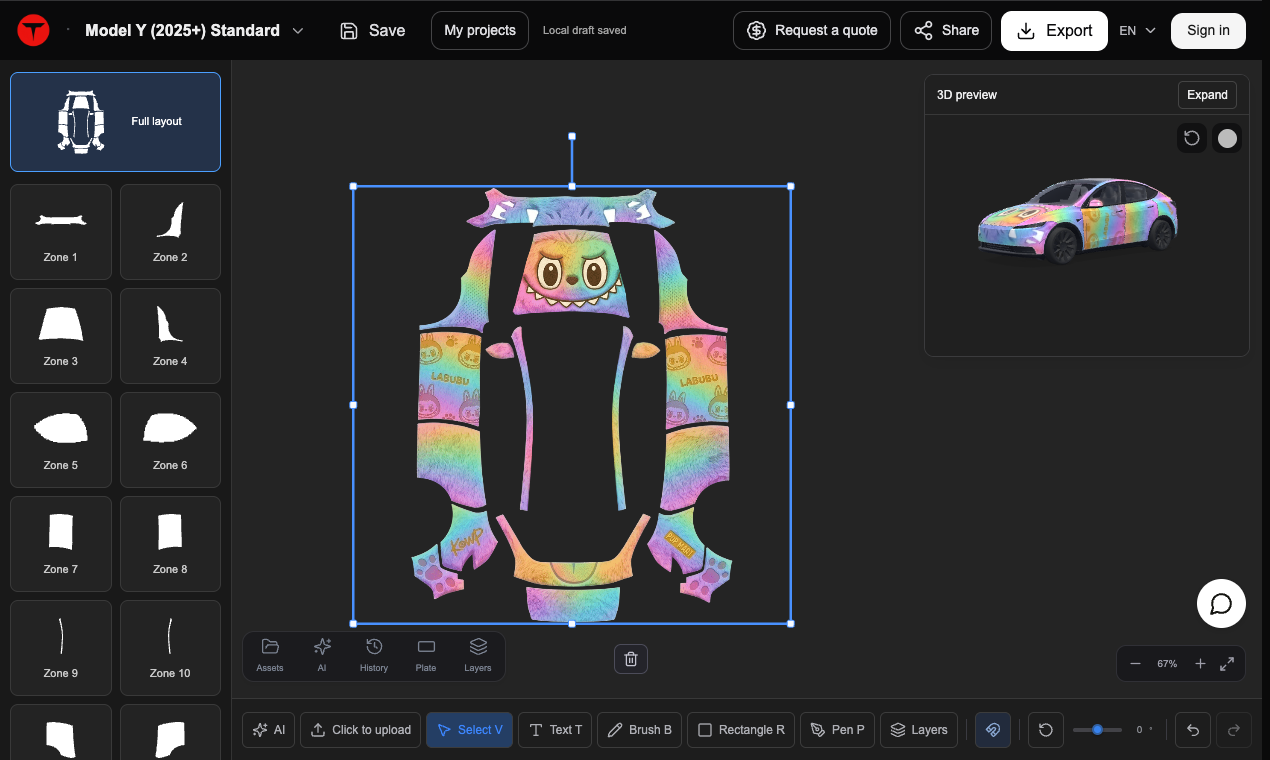
Manual editing, the 3D preview and PNG downloads are free. Optional AI generation from a description or reference image uses paid credits, but you do not need those credits for manual editing.
Website: Tesla Wrap Pro
These designs change the car's on-screen visualization, not physical paint or vinyl. Follow the Paint Shop import instructions for your actual vehicle and software version. This is an independent third-party project with no official Tesla affiliation.
I'm interested in feedback on whether the flat layout and 3D preview make the placement clear. Happy to hear what is confusing or could be easier.
The project started from wanting to customize the 3D vehicle shown on a Tesla's screen. I wanted to introduce the free manual editor here and explain a simple way to use it with artwork you already have.
A first manual design
Open the gallery, choose the vehicle model you need, and select a design that supports editing. Add an image you own or have permission to use, or add a short text label. Adjust the size and position, change panel colors, and compare the flat layout with the 3D preview.
Before downloading, look at the front, rear and both sides. A detail that looks good in the flat layout may cross a panel edge awkwardly on the vehicle. Moving it slightly can help without having to create new artwork.
Manual editing, the 3D preview and PNG downloads are free. Optional AI generation from a description or reference image uses paid credits, but you do not need those credits for manual editing.
Website: Tesla Wrap Pro
These designs change the car's on-screen visualization, not physical paint or vinyl. Follow the Paint Shop import instructions for your actual vehicle and software version. This is an independent third-party project with no official Tesla affiliation.
I'm interested in feedback on whether the flat layout and 3D preview make the placement clear. Happy to hear what is confusing or could be easier.